You have probably seen Claude mentioned in a colleague’s screenshot, a LinkedIn post, or a news headline about Anthropic. Search interest in Claude AI has climbed sharply in Singapore over the past year, and for good reason. It has quietly become one of the tools professionals here reach for to write, analyse, and think through their work.
This guide is a plain-English map of Claude AI. It explains what Claude is, who builds it, the different models and products on offer, and, most usefully, which parts suit which kind of work. Whether you work in finance, marketing, operations, or HR, and whether you have never opened Claude or already use it daily, you will finish this article knowing exactly where to start and what to try next.
What Is Claude AI?
Claude AI is a conversational AI assistant built by the company Anthropic. You make a request in ordinary language, and Claude responds in kind, whether that means drafting an email, summarising a long report, explaining a tricky concept, analysing a spreadsheet, or working through a problem with you step by step.
Think of it as a capable colleague who has read very widely, works quickly, and is available whenever you are. It sits in the same broad category as ChatGPT and Google’s Gemini, though it has its own strengths and a distinct design philosophy, which we come to shortly.
Claude works through a simple chat interface on the web, your phone, or your desktop. There is nothing to install to get started, and no technical background required. The skill is not in operating the tool, it is in knowing what to ask and how to check what comes back, which is exactly the kind of practical judgement that rewards a little structured practice.
Who Makes Claude? A Quick Look at Anthropic
Anthropic is the company behind Claude, which is why the two names so often appear together in search. Anthropic is a US-based AI research company founded in 2021 by a group of researchers who previously worked at OpenAI, including siblings Dario and Daniela Amodei.
The company was built around a specific idea: that as AI systems grow more powerful, safety and reliability should be designed in from the start rather than added later. Anthropic is structured as a public benefit corporation, so it is formally accountable for its stated mission of building AI that is reliable, interpretable, and steerable, alongside its commercial goals.
For you as a user, this shows up in practical ways. Claude is designed to be careful about what it claims, to acknowledge uncertainty rather than invent an answer, and to decline requests that could cause harm. That reliability is a large part of why Claude has found a following among professionals in regulated fields such as finance and law.
The Claude Model Line-Up, Explained
Claude is not a single model but a family of them, and the family grew quickly through 2026. Each model trades speed and cost against raw capability, and the name tells you roughly where each one sits.
Here is the current line-up, from lightest to most capable:
|
Model |
Best for |
Speed and cost |
|---|---|---|
|
Claude Haiku 4.5 |
Quick, high-volume, straightforward tasks |
Fastest, lowest cost |
|
Claude Sonnet 5 |
Everyday work: writing, analysis, research |
Balanced, the default for most users |
|
Claude Opus 4.8 |
Harder reasoning, complex analysis, larger tasks |
Slower, higher cost |
|
Claude Fable 5 |
Maximum quality when a task truly demands it |
Premium, advanced tier |
Two things are worth knowing. First, on the everyday plans you rarely choose a model by hand. Claude defaults to Sonnet 5, which comfortably handles the large majority of professional tasks, and you only reach for Opus when a job is genuinely demanding. Second, the newest additions, Claude Fable 5 and a restricted tier called Mythos, sit at the frontier of what Claude can do, and they have been the subject of a fair amount of news.
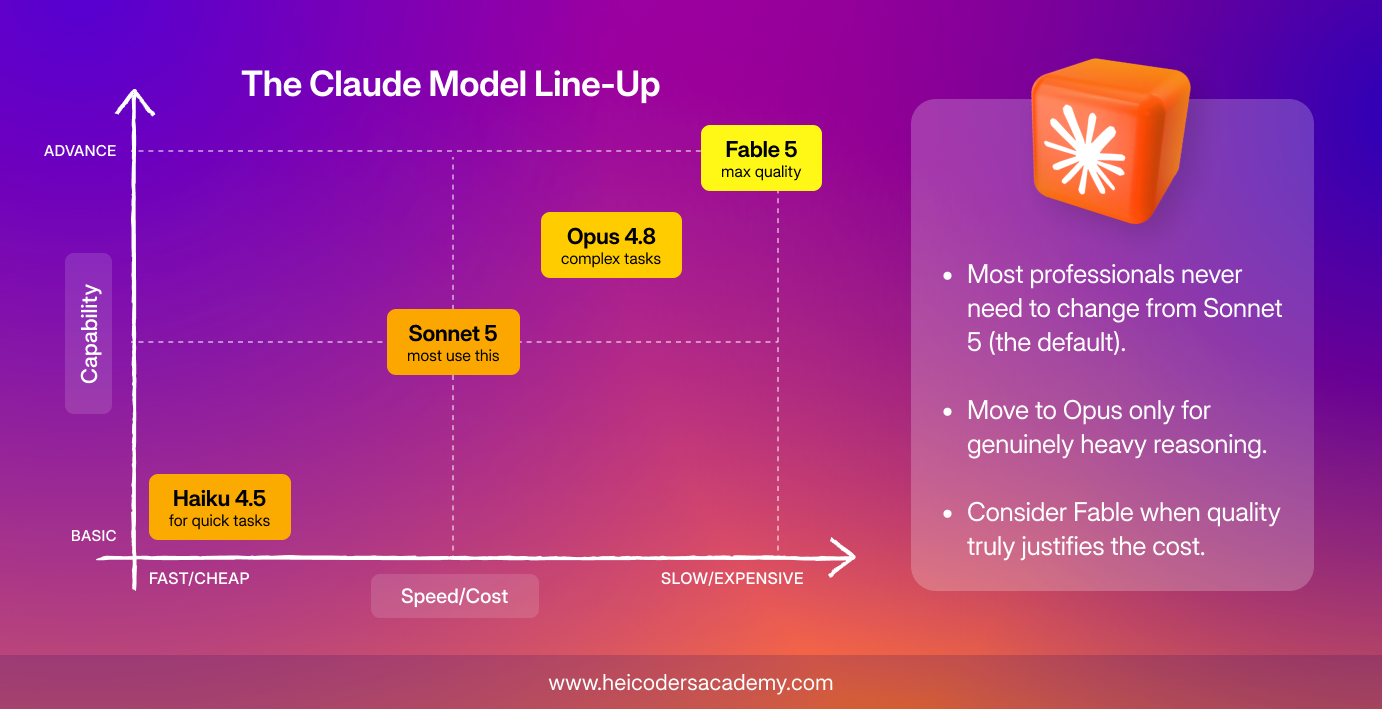
Which Claude model should you use?
For most professionals, the honest answer is that you do not need to overthink this. Start with the default, Sonnet 5, which is available even on the free plan and handles writing, summarising, and everyday analysis well. Move up to Opus for the occasional heavy task, such as reasoning through a complex problem or working across a long, dense document. Fable is a premium option for when quality genuinely justifies the cost. If in doubt, begin with the default and change only when you hit its limits.
What are Claude Fable 5 and the Mythos tier?
Claude Fable 5 is Anthropic’s most capable publicly available model, released in June 2026 as the first of a higher tier the company calls Mythos. Fable 5 and its sibling, Claude Mythos 5, share the same underlying model. The difference is safety, not power: Fable ships with extra safeguards around sensitive areas such as cybersecurity and the life sciences, while Mythos 5 has those guardrails lifted and is restricted to a small number of vetted organisations rather than the general public.
Shortly after launch, access to both models was briefly suspended in June 2026 to comply with a US export-control directive, then restored on 1 July 2026 once updated safeguards were in place. All other Claude models stayed available throughout. You can read Anthropic’s own account of that episode. For the everyday professional, the practical takeaway is simple: you may occasionally see Fable offered as a premium option, but Sonnet and Opus will cover almost everything you need.
The Claude Products You Will Actually Use
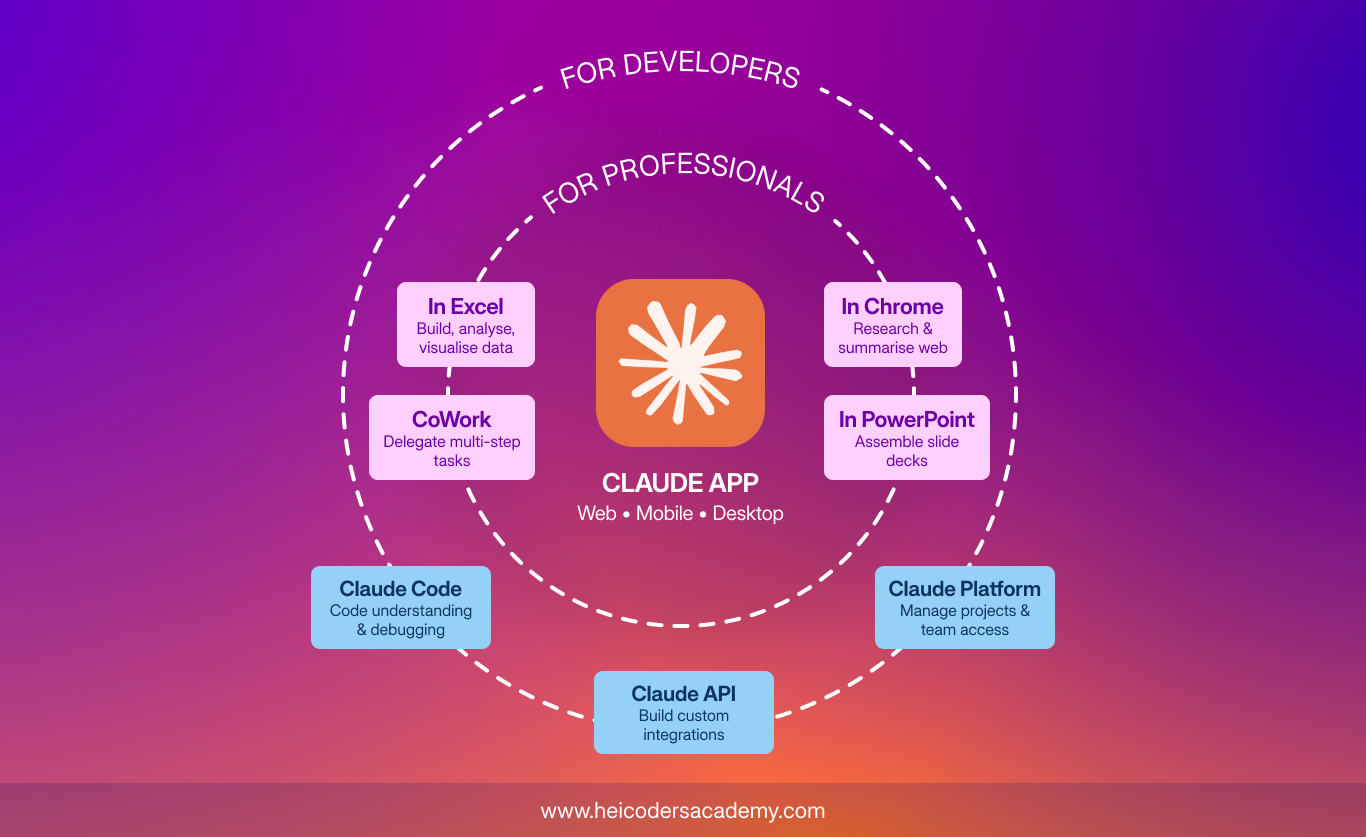
Beyond the chat box, Claude comes in several forms, each suited to a different kind of work. Here are the ones worth knowing, grouped by who they are for.
For most professionals:
- The Claude app is the main way in. It is the chat assistant on the web, your phone, and your desktop, and it syncs across all three. This is where you draft, summarise, brainstorm, and analyse documents. If you try only one thing, try this.
- Claude Cowork lets you hand over whole tasks rather than single questions. You give it an outcome, such as organising a messy folder or turning a set of documents into a first-draft deck, and it plans and works through the steps across the files and apps you approve. It was built for non-technical staff who wanted to delegate multi-step work.
- Claude in Excel and Claude in PowerPoint bring Claude inside Microsoft Office, so it can build and edit spreadsheets with working formulas and assemble slide decks without you leaving the app.
- Claude in Chrome works inside your browser, helping with research, pulling information from pages, and handling repetitive online tasks.
For developers (covered briefly):
- Claude Code is a tool for software engineers that understands an entire codebase and can write and fix code across many files. It is widely used in the developer community, though it requires technical setup.
- The Claude API and Claude Platform let companies build Claude directly into their own software. If you simply want to use Claude for your own work, you want a subscription, not the API.
The short version: if you are not a developer, your toolkit is the Claude app, Cowork, and the Office and Chrome integrations. That combination covers the large majority of professional use.
Features That Make Claude Useful for Work
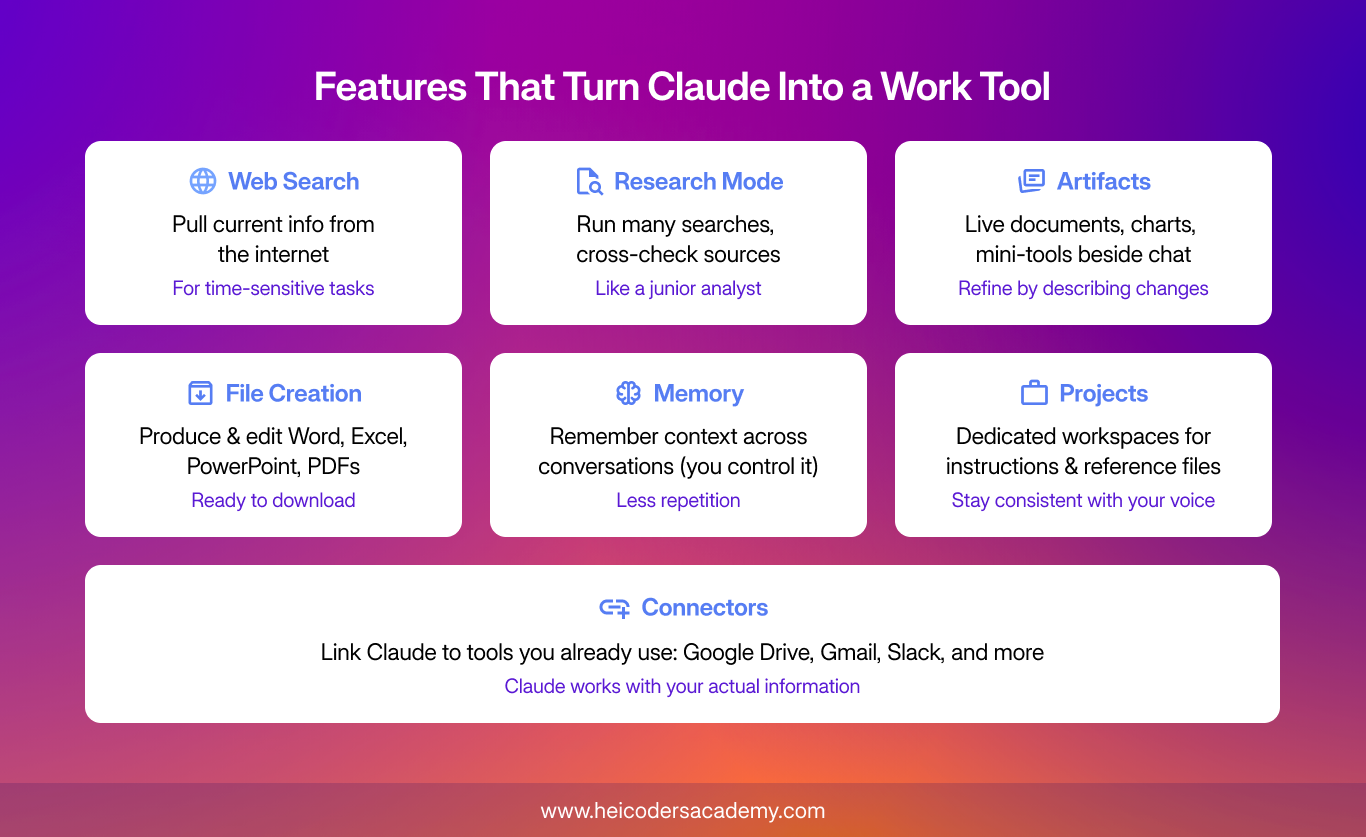
A few built-in features turn Claude from a clever chat partner into a genuine work tool. These are the ones professionals lean on most:
- Web search lets Claude pull current information from the internet rather than relying only on what it learned during training. Switch it on for anything time-sensitive.
- Research mode is a step up: Claude runs many searches, cross-checks sources, and returns a structured, referenced brief. Think of it as a junior analyst preparing a first pass on a question.
- Artifacts are live documents, charts, or mini-tools that appear beside your chat, so you can refine them by simply describing the change you want.
- File creation means Claude can produce and edit Word documents, Excel sheets, PowerPoint decks, and PDFs directly.
- Memory allows Claude to remember useful context across conversations, such as your role, preferences, and ongoing projects, so you repeat yourself less. You stay in control of what it keeps.
- Projects are dedicated workspaces that hold your instructions and reference files in one place, so Claude stays consistent with your voice and context.
- Connectors link Claude to tools you already use, such as Google Drive, Gmail, and Slack, so it can work with your actual information.
You do not need all of these on day one. Web search, Artifacts, and file creation are the fastest wins for most people, with Research and Projects worth learning once the basics feel comfortable.
How Claude Compares to Other AI Assistants
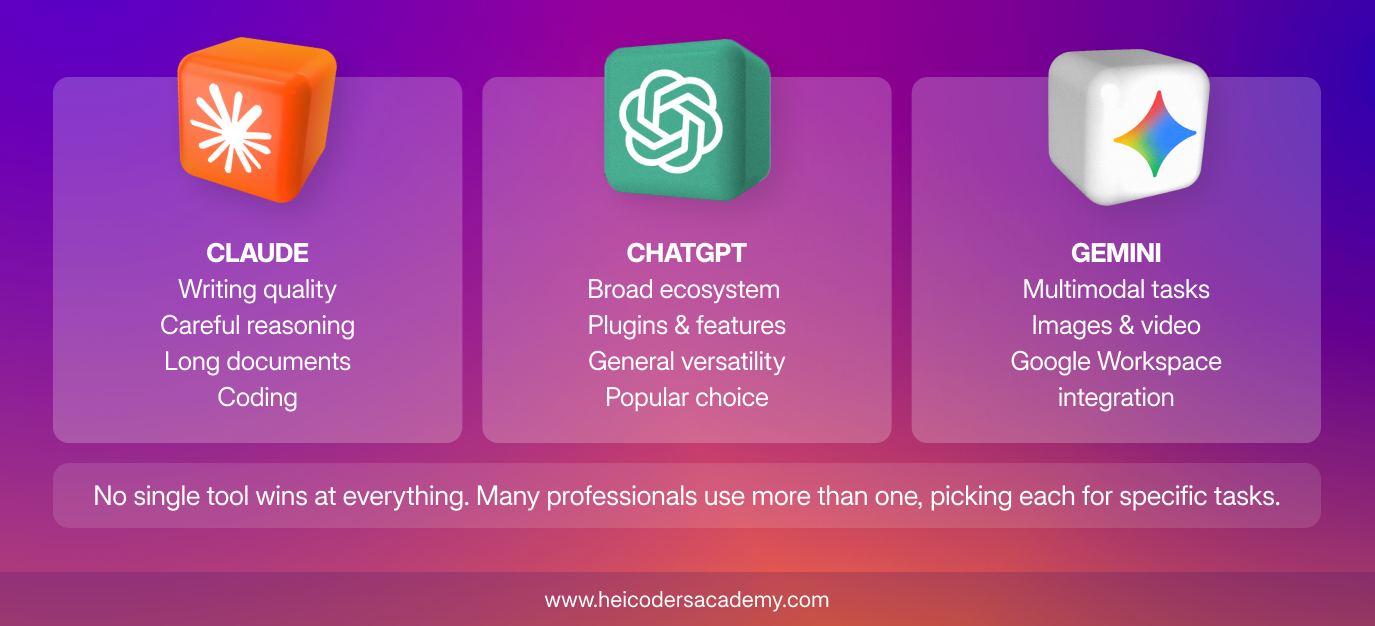
No single AI assistant is best at everything in 2026, and many professionals happily use more than one. At a high level, here is how Claude tends to be described against the two other major assistants, based on widely reported testing.
|
Assistant |
Often chosen for |
|---|---|
|
Claude (Anthropic) |
Writing quality, careful reasoning, long-document analysis, and coding |
|
ChatGPT (OpenAI) |
A broad ecosystem of features and general versatility |
|
Gemini (Google) |
Multimodal tasks and tight integration with Google Workspace |
The honest summary is that these tools overlap heavily and all three are capable. Professionals often gravitate to Claude for drafting and refining writing, reviewing long contracts and reports, and structured analysis, the kind of considered, text-heavy work that fills a Singapore knowledge worker’s day.
It is also common to pair Claude with a more autonomous agent for certain jobs. If you work with agentic tools, our guide on how Manus AI and Claude complement each other walks through when to use each and how to combine them.
Claude in Singapore
Singapore is one of the most active Claude markets in the world. Anthropic’s Economic Index, published in 2026, ranked Singapore first globally for how intensively people here use Claude relative to the size of the workforce, at several times the rate you would expect for its population.
There is a financial connection too. Singapore’s sovereign investor GIC led one of Anthropic’s major funding rounds in 2026, with Temasek also taking part, so the country is invested in Claude in more than one sense. Locally, organisations in regulated sectors have started training their teams to use it well. Heicoders Academy, for instance, ran a customised programme for the investment team at Temasek Trust Asset Management, focused on using Claude with rigour and careful verification in a setting where accuracy is non-negotiable. You can read what that involved in the Temasek Trust Asset Management case study.
For individuals, there is a practical bonus. Claude Pro is among the AI tools recognised under NTUC’s Union Training Assistance Programme, which means eligible NTUC members may be able to claim support on the subscription, subject to the scheme’s terms. Our breakdown of the UTAP-approved AI tools in Singapore explains who qualifies and how the claim works.

How to Start Using Claude AI
Getting going takes minutes, not weeks. Here is a simple path from curious to capable:
- Create a free account at claude.ai and open it on both your laptop and your phone.
- Give it real work, not test questions. Ask it to redraft an actual email, summarise a document you were about to read, or think through a decision you are weighing.
- Turn on web search when you need current information, and try creating a file or an Artifact to see what it can produce.
- Upgrade to a paid plan only when you start hitting the free plan’s limits, which for regular users tends to happen fairly quickly.
- Once the basics feel natural, learn the higher-value features, Research, Projects, and Cowork, which is where the real time savings live.
The tools are easy to open. The lasting advantage comes from using them with good judgement, knowing what to delegate, how to prompt clearly, and how to check the output, which is a learnable skill.
Frequently Asked Questions
What is Claude AI?
Claude AI is a conversational AI assistant made by the company Anthropic. You interact with it in plain language to write, analyse, summarise, research, and problem-solve, through a chat interface on the web, mobile, or desktop.
Who owns Claude, and how is it related to Anthropic?
Claude is built and owned by Anthropic, a US-based AI research company founded in 2021. When people search for “Claude Anthropic”, they are usually just connecting the assistant, Claude, with the company that makes it, Anthropic.
Is Claude AI free to use?
Yes, Claude offers a free plan that covers everyday use, with paid plans such as Pro for people who need higher usage limits and access to more capable models. Pricing is set in US dollars and can change, so check the current rates on Claude’s official site before subscribing.
What is the difference between Claude and ChatGPT?
Both are conversational AI assistants, and they overlap heavily. Claude, from Anthropic, is often chosen for writing quality, careful reasoning, and long-document analysis, while ChatGPT, from OpenAI, is known for a broad ecosystem of features. Many professionals try both and settle on a preference for particular tasks.
What is Claude Fable 5?
Claude Fable 5 is Anthropic’s most capable publicly available model, released in June 2026 as the first of its higher Mythos tier. For most everyday work, the standard Sonnet and Opus models are more than sufficient, and Fable is a premium option for tasks that genuinely demand the highest capability.
Can I use Claude AI in Singapore?
Yes, Claude is available in Singapore on the web, mobile, and desktop, and Singapore is in fact one of the most active Claude markets globally. Eligible NTUC members may also be able to claim support on a Claude Pro subscription through the UTAP scheme, subject to its terms.
Which Claude model should I use for work?
For most professional tasks, the default model, Sonnet 5, is the right starting point. Move up to Opus for genuinely demanding reasoning or analysis, and consider Fable only when a task truly justifies the top tier. On the everyday plans, Claude selects a sensible default for you.
How can I learn to use AI tools like Claude properly for my job?
The fastest way is structured, hands-on practice with real tasks rather than reading alone. Heicoders Academy’s Generative AI Course focuses on the underlying skills, sharp prompting, sound workflow design, and careful verification, that apply no matter which AI tool you are using, so what you learn transfers directly to Claude or any other tool you pick up.
Ready to Go Further?
Understanding what Claude can do is the first step. Turning that into a reliable, everyday skill is where the real value lies, and like any skill, it improves with structured practice and the right guidance. Heicoders Academy’s Generative AI Course (GA100) is a SkillsFuture-eligible, WSQ-certified programme built for working professionals in Singapore who want to apply AI practically across their role. The course is built around transferable skills, sharp prompting, sound workflow design, and careful verification, so what you learn applies no matter which AI tool you end up using. Explore the GA100 Generative AI Course and build the judgement to use AI well, not just occasionally.

Terms and conditions apply. Course subsidies and SkillsFuture Credit are subject to eligibility. Always check your eligibility at www.skillsfuture.gov.sg. UTAP support is available to NTUC members only and is subject to the prevailing terms of the scheme.
References
- Anthropic, “Claude Fable 5 and Claude Mythos 5” (2026). anthropic.com/news/claude-fable-5-mythos-5
- Anthropic, statement on access to Fable 5 and Mythos 5 (2026). anthropic.com/news/fable-mythos-access
- GIC, “GIC Leads Series G in Anthropic” (2026). gic.com.sg/newsroom
- Anthropic Economic Index (2026).