Last updated: 29 October 2026
Most course pages list topics. Few show what you actually make by the end. If you’re weighing up a generative AI course, that’s often the question that matters most: will I build something I can use at work, or just sit through demos?
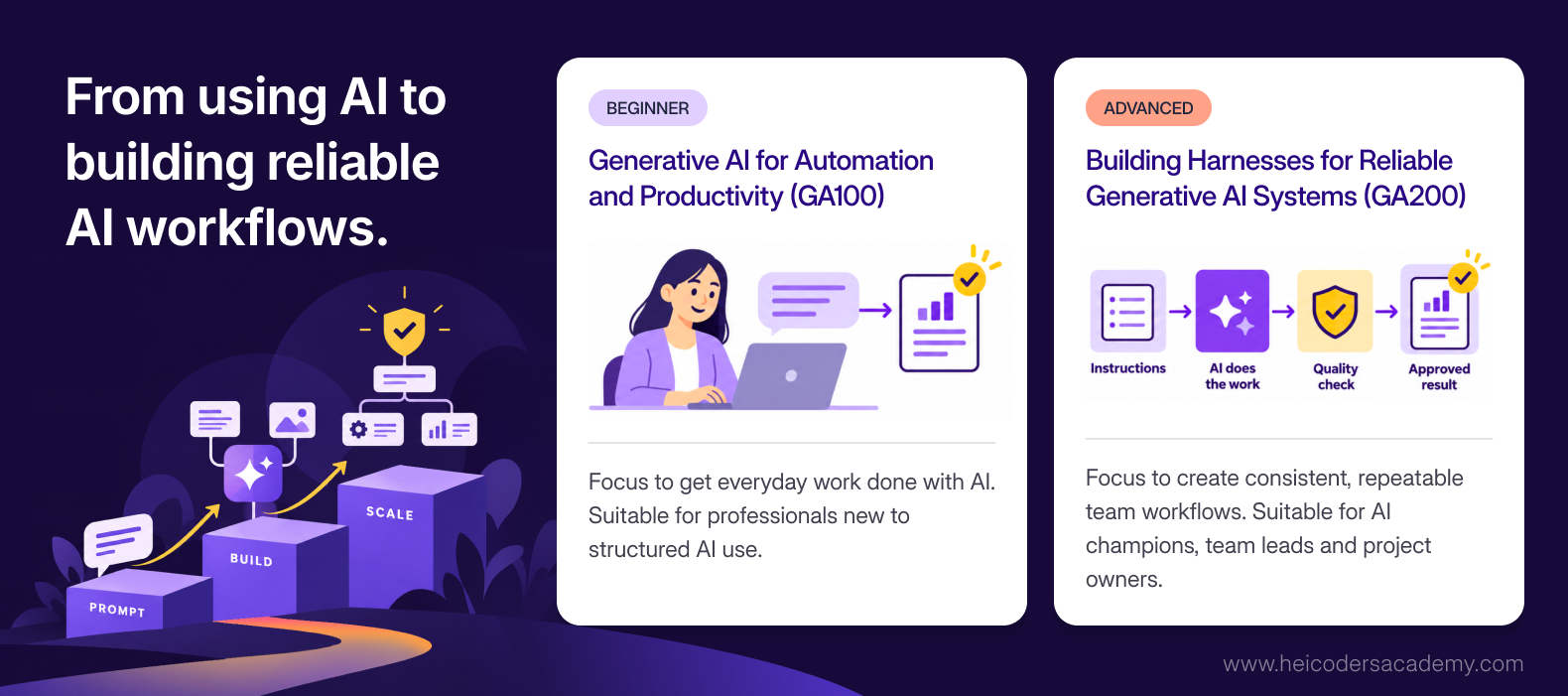
This guide answers that question for Heicoders Academy’s two generative AI courses. The beginner course, Generative AI for Automation and Productivity (GA100), takes you from using AI tools to building your own workflows and agents. The advanced course, Building Harnesses for Reliable Generative AI Systems (GA200), takes you from building AI tools for yourself to setting up AI systems that teams can rely on.
We’ll go through all 12 lessons, showing what you learn and what you build in each. You’ll also see how the two courses connect, what past learners have built, and how to decide where to start.
Generative AI for Automation and Productivity (GA100) vs Building Harnesses for Reliable Generative AI Systems (GA200) Courses at a Glance
Both courses are hands-on, need no coding and run for 18 hours. The difference is the level of work they prepare you for.
| GA100 (Beginner) | GA200 (Advanced) | |
|---|---|---|
| Full course title | Generative AI for Automation and Productivity | Building Harnesses for Reliable Generative AI Systems |
| Focus | AI productivity for you and your team | Reliable AI systems across teams and the organisation |
| Who it’s for | Professionals new to structured AI use | AI champions, team leads, managers, and vendor and project owners |
| Starting point | Basic digital literacy | Designed as the next step after GA100 |
| Coding needed | None | None |
| Duration | 18 hours over six lessons | 18 hours over six lessons |
| Schedule options | Three full days or six part-time sessions | Three full days or six part-time sessions |
| Format | Classroom or live online | Classroom or live online |
| Example tools | ChatGPT, Nano Banana, ElevenLabs, Manus AI, n8n | ChatGPT Work, Claude Cowork and other work-oriented AI environments |
| Certification | WSQ Statement of Attainment plus a Heicoders Academy certificate | WSQ Statement of Attainment plus a Heicoders Academy certificate |
| Course reference numbers | TGS-2025055033 (online), TGS-2025057662 (classroom) | TGS-2025059611 (online), TGS-2025059894 (classroom) |
Both courses share one principle: tools change constantly, but the principles behind them don’t. Each lesson teaches a principle, then has you apply it with current tools.
Part 1: What You Build in Generative AI for Automation and Productivity Course (GA100)
GA100 is the starting point. By the end, you’ll have moved from occasional AI use to building workflows, agents and simple AI tools around your own tasks.
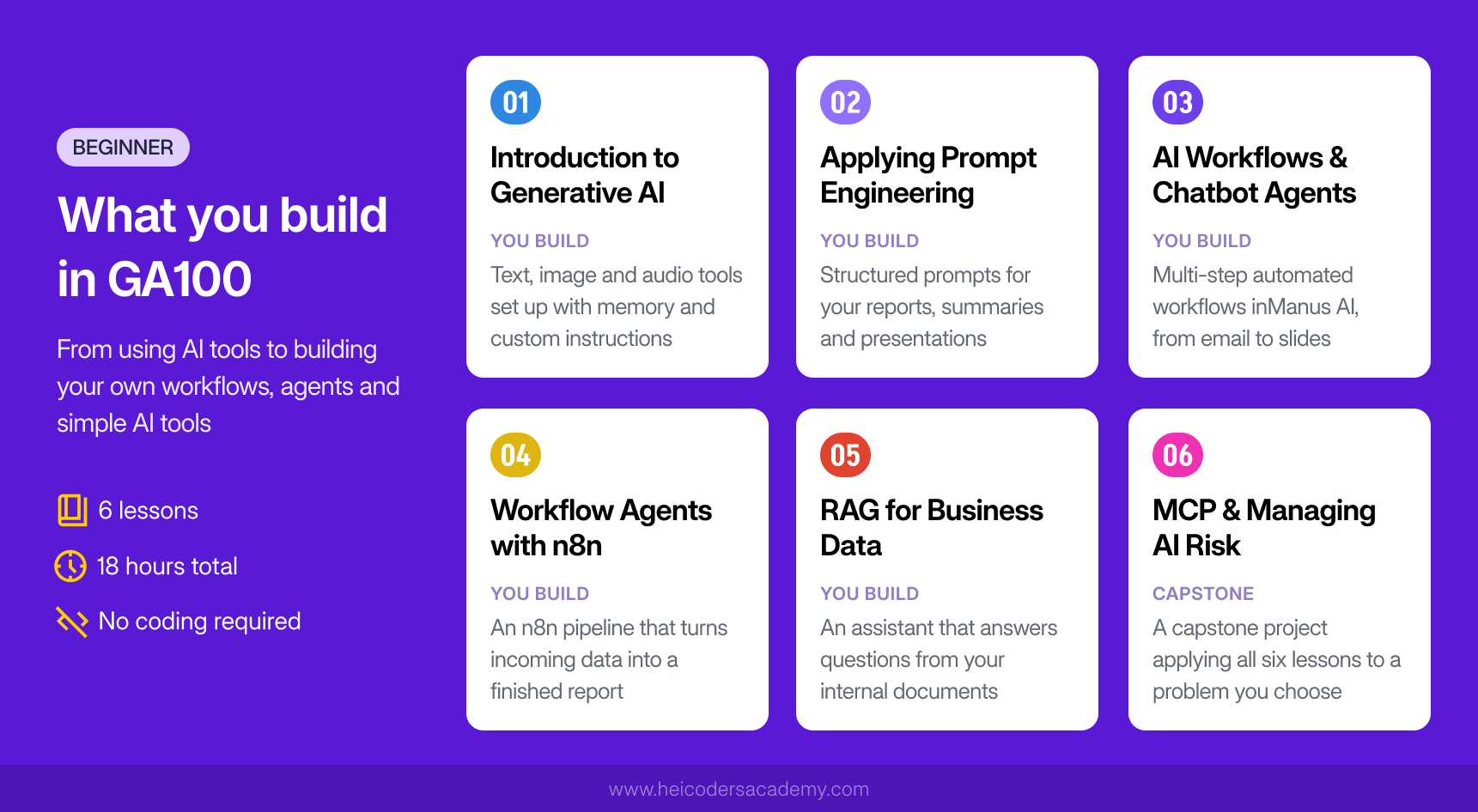
Lesson 1: Introduction to Generative AI
What you learn: how large language models (LLMs) actually work, and why they sometimes get things wrong. You’ll explore their main limitations, such as context window limits and hallucinations, and how to reduce their impact.
What you build: hands-on experience across different types of generative AI tools. You’ll work with ChatGPT for text, Nano Banana for images and ElevenLabs for audio. You’ll also set up context engineering features such as memory and custom instructions, so the AI understands your role and preferences, and you’ll use deep research features to support a writing task.
Why it matters: understanding how the tools work makes you better at judging when to trust an output and when to check it.
Lesson 2: Applying Prompt Engineering to Your Work
What you learn: structured prompting techniques that make outputs more reliable. These include chain-of-thought prompting, which asks the AI to reason step by step, and few-shot prompting, which gives the AI examples to follow.
What you build: prompts for tasks from your own work. Rather than practising on generic examples, you’ll apply each technique to real tasks such as drafting reports, summarising documents and preparing presentations.
Why it matters: most people use AI with short, one-line prompts. Learning to structure prompts properly is often the biggest single improvement in output quality.
Lesson 3: AI Workflows and Chatbot AI Agents
What you learn: the difference between using AI as a chatbot and using it as an agent that carries out multi-step tasks. You’ll also learn to design AI workflows around well-structured processes.
What you build: multi-step automated workflows using Manus AI, across business scenarios such as email automation, data analysis, wide research, spreadsheet automation and slide generation. Heicoders Academy is the official training partner of Manus AI, so this lesson uses current agentic features.
Why it matters: agents can complete whole tasks, not just give single answers. Knowing how to brief them and check their work is quickly becoming a core workplace skill.
Lesson 4: Building Workflow AI Agents With n8n for Automation
What you learn: how to connect different apps and services into automated pipelines using n8n, a visual workflow automation tool.
What you build: an automated workflow that handles a repetitive process from start to finish, such as extracting data from incoming information and generating a report. Because n8n is visual, you build these by connecting blocks rather than writing code.
Why it matters: many repetitive tasks follow the same steps every time. Automating them frees up time for work that needs your judgement.
Lesson 5: Retrieval-Augmented Generation (RAG) for Business Data
What you learn: how to give AI tools access to the right information, so their answers come from your organisation’s documents rather than general knowledge. You’ll also learn simple ways to test how accurate and reliable your AI outputs are.
What you build: a simple RAG pipeline that combines AI with business data, such as an assistant that answers questions from a set of internal documents.
Why it matters: an AI that answers from your own data is far more useful at work, and much less likely to make things up.
Lesson 6: Model Context Protocol (MCP) and Managing AI Risk
What you learn: how the Model Context Protocol (MCP) lets AI tools connect to other applications and data sources. You’ll also learn to spot risks such as hallucinations, bias and security issues, and apply frameworks for using AI safely and responsibly.
What you build: a capstone project, where you apply the skills from all six lessons to a problem of your choice.
Why it matters: as AI tools gain access to more systems and data, knowing how to manage the risks is as important as knowing how to use them.
Part 2: What You Build in Building Harnesses for Reliable Generative AI Systems Course (GA200)
GA200 starts where GA100 ends. In GA100, you build AI tools that work for you. In GA200, you learn to set up AI systems that hold up when a team, clients or business data depend on them. The course is built on a simple idea: a working demo and a system you can rely on every day are two different things.
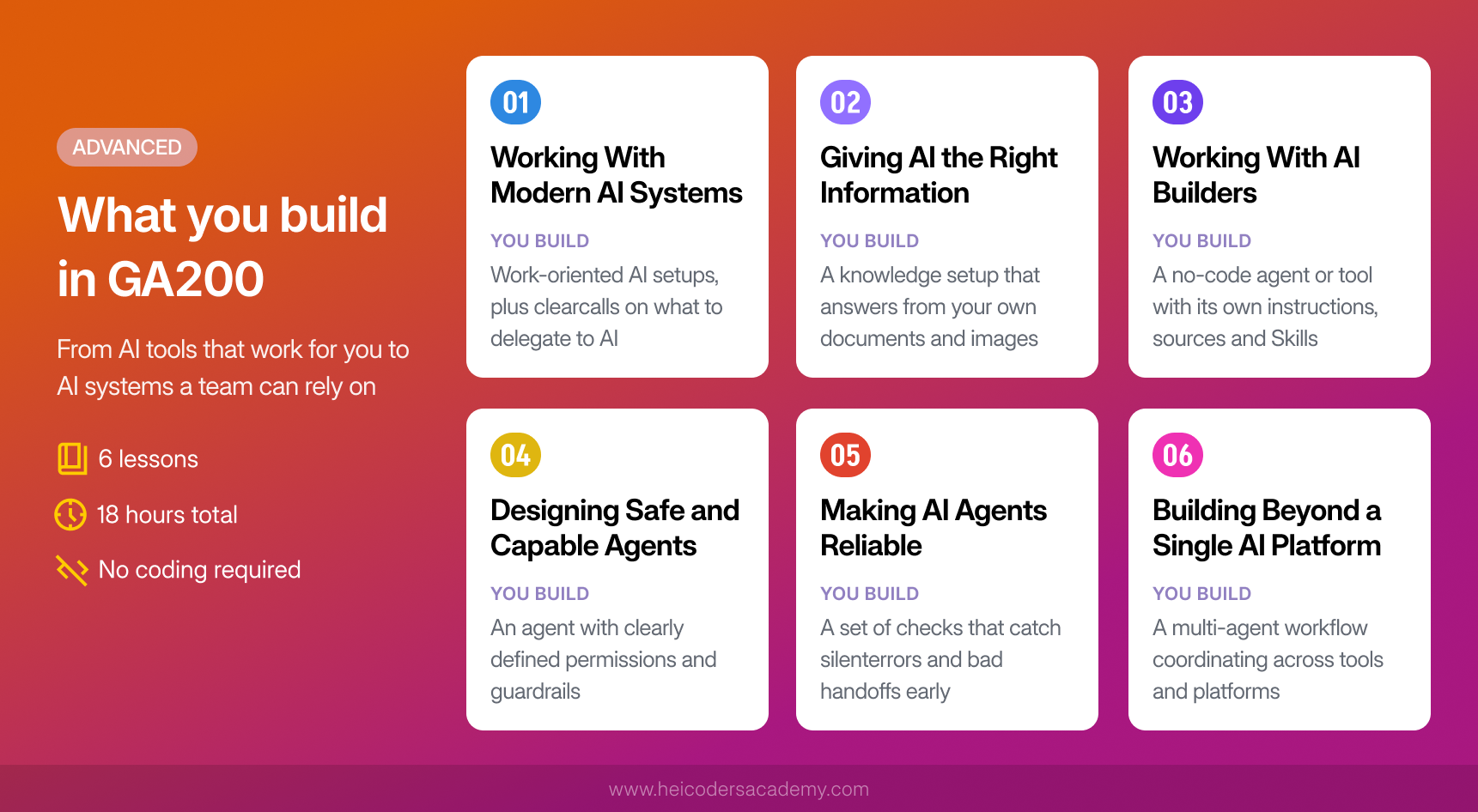
Lesson 1: Working With Modern AI Systems
What you learn: how AI has moved from answering questions to completing multi-step work. You’ll learn to tell the difference between instructions, reusable Skills, tools, connectors and permissions, which are the building blocks of a modern AI system.
What you build: hands-on experience with work-oriented AI environments such as ChatGPT Work and Claude Cowork. You’ll also make clear decisions about which work can be delegated to AI, what needs to be set up in advance, and what still needs human oversight.
Why it matters: before you can make an AI system reliable, you need to know which part of it controls which behaviour.
Lesson 2: Giving AI the Right Information
What you learn: context engineering and knowledge engineering, which cover how to give an AI system the information it needs, in the right form, at the right time. This includes multimodal RAG, which connects AI to documents, images and business data, and persistent memory, so a system can carry context forward.
What you build: a knowledge setup that lets an AI system answer from your own documents and images, so it gives grounded answers instead of confident guesses.
Why it matters: most AI errors at work come from missing or poorly structured information, not from the model itself.
Lesson 3: Working With AI Builders
What you learn: how to use AI builder tools to create agents and AI-powered tools without writing code, and how to package repeated work into reusable Skills.
What you build: an AI agent or tool set up with its own instructions, information sources and reusable Skills, designed for a specific task in your work.
Why it matters: reusable building blocks are what turn a one-off experiment into something a team can use again and again.
Lesson 4: Designing Safe and Capable Agents
What you learn: harness engineering, which means designing the setup around an AI agent so it behaves reliably. That covers its instructions, tools, permissions and safeguards. You’ll also learn how to protect agents against risks such as prompt injection, where hidden instructions try to make an AI do something it shouldn’t.
What you build: an agent with clearly defined permissions and guardrails, so it can do useful work without overstepping its role.
Why it matters: the more an agent can do, the more important it is to control what it’s allowed to do.
Lesson 5: Making AI Agents Reliable
What you learn: how to evaluate whether an AI agent is working properly, using methods such as evaluation sets and regression testing. These check that a system still works after changes. You’ll also learn loop engineering: designing feedback loops so a system keeps improving with use.
What you build: a set of checks for an AI workflow that catch problems such as silent errors and bad handoffs before real users do.
Why it matters: AI systems can fail quietly. Evaluation is what tells you whether a system is still working, not just whether it worked on the day you built it.
Lesson 6: Building Beyond a Single AI Platform
What you learn: how to design multi-agent systems, where specialised agents hand off tasks and context to each other to complete a full workflow. You’ll also look at the trade-offs behind real deployment, such as cost, reliability and which platform suits which job.
What you build: a multi-agent workflow in which agents coordinate on a shared task across tools and platforms.
Why it matters: organisations rarely run on a single AI tool. Knowing how to make systems work across platforms is what lets AI move from individual use to team-wide use.
How the Two Generative AI Courses Connect
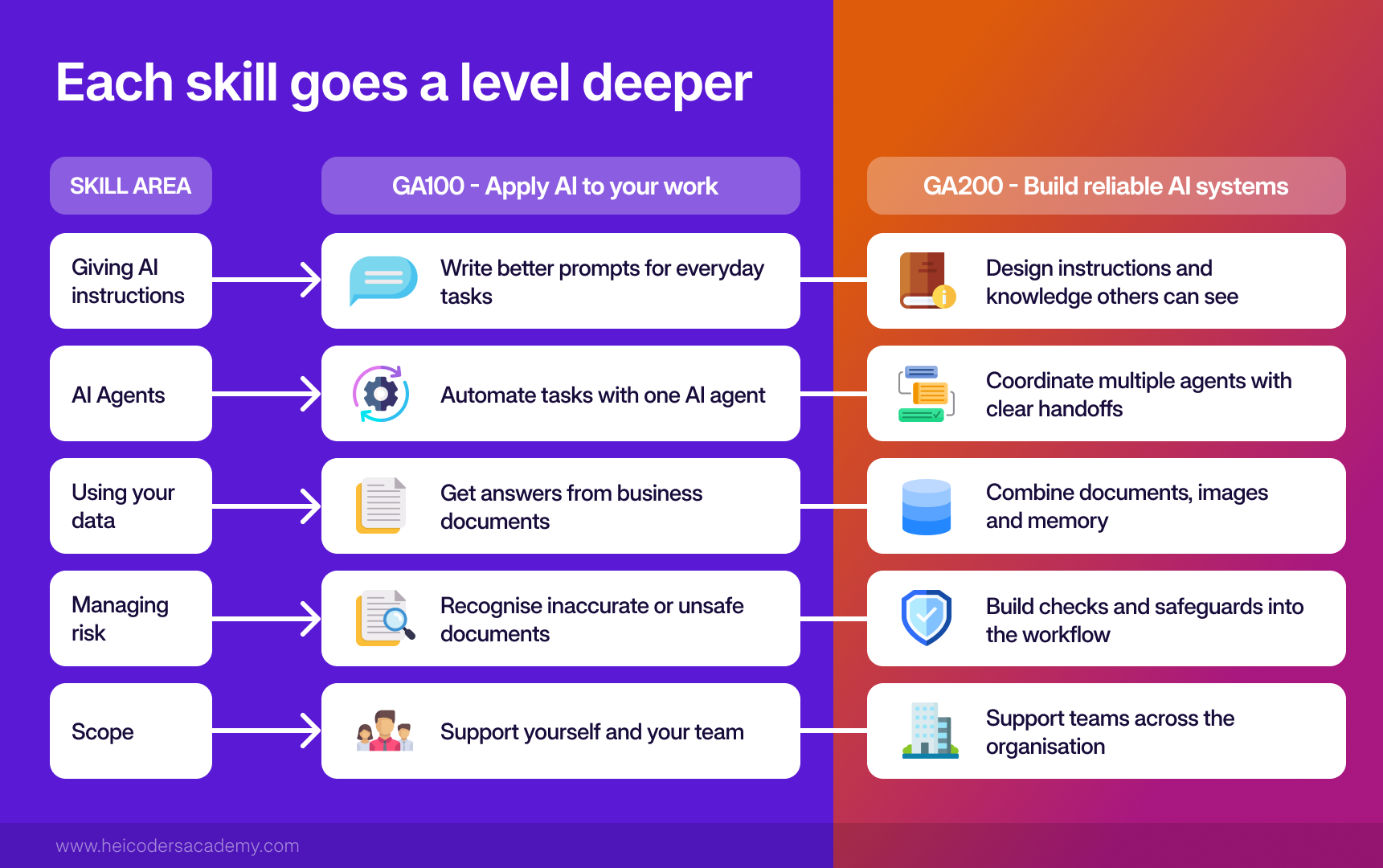
GA200 isn’t a repeat of GA100 with harder exercises. Each core skill goes a level deeper, as the table below shows.
| Skill area | In Generative AI for Automation and Productivity Course (GA100) | In What You Build in Building Harnesses for Reliable Generative AI Systems Course (GA200) |
|---|---|---|
| Giving AI instructions | Prompt engineering for your own tasks | Context and knowledge engineering for systems others use |
| Agents | Building single agents and automated workflows | Designing multi-agent systems with handoffs |
| Using your data | RAG with business documents | Multimodal RAG with documents, images and persistent memory |
| Managing risk | Spotting hallucinations, bias and security risks | Building guardrails, safeguards against prompt injection, and evaluations |
| Scope | You and your team | Teams, departments and the wider organisation |
Key Terms Explained
These are the core concepts across both courses, in plain language.
- Prompt engineering: writing instructions that get clear, reliable outputs from an AI tool.
- Context engineering: giving an AI system the right background information, such as your role, goals and documents, so its answers fit your situation.
- AI agent: an AI system that carries out multi-step tasks on its own, such as researching, drafting and organising, rather than answering one question at a time.
- Workflow automation: connecting apps and steps so a repeated process runs automatically.
- Retrieval-augmented generation (RAG): a method that lets AI answer from a specific set of documents or data, which makes answers more accurate and current.
- Multimodal RAG: RAG that works across different types of content, such as text, images and data.
- Model Context Protocol (MCP): a standard way for AI tools to connect to other applications and data sources.
- Harness engineering: designing everything around an AI model, including its instructions, tools, permissions, memory and checks, so it behaves reliably.
- Loop engineering: designing feedback loops, where an AI system’s outputs are checked and used to improve how it works over time.
- Multi-agent system: several specialised AI agents working together on a task, each handling one part.
- Evaluation and guardrails: tests that measure whether an AI system is working as intended, and limits that stop it from doing things it shouldn’t.
What Past Learners Have Built Through Our Generative AI Courses
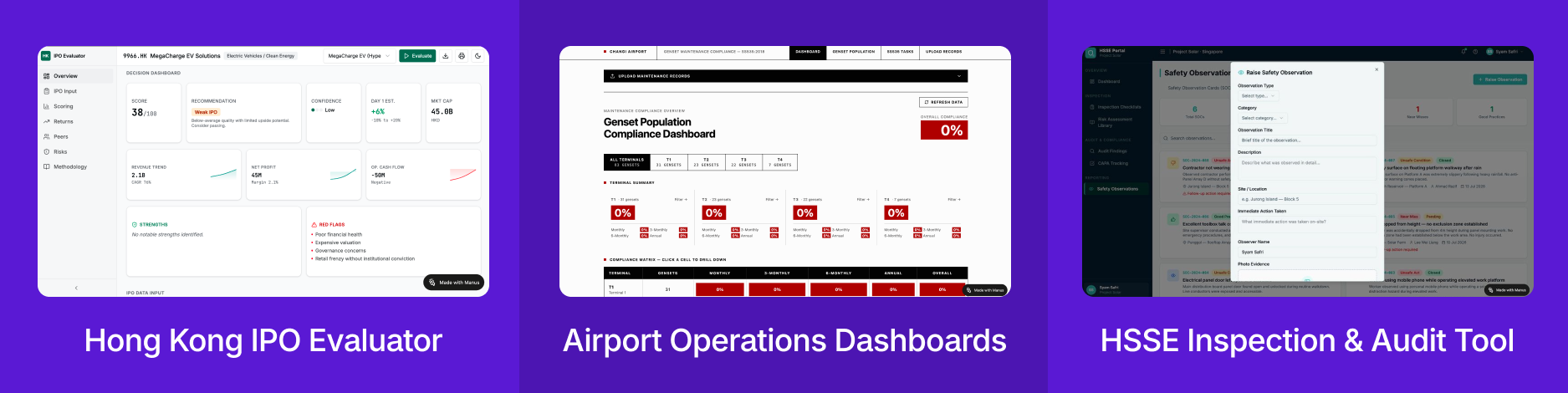
Capstone projects give a sense of what’s possible after GA100. Here are a few examples:
- A Hong Kong IPO evaluator: Boon Peng Yeo, a GA100 alumnus (May 2026), built a working website with Manus AI that pulls in live IPO data. Read his story.
- Airport operations dashboards: staff at Changi Airport Group built tools such as a dashboard tracking maintenance compliance across the airport’s generator sets.
- A safety inspection tool: participants at Sembcorp Industries built an inspection and audit tool for health, safety, security and environment (HSSE) workflows.
What you build depends on your role and the problem you choose, but the common thread is tools built for real work.
Which Generative AI Course Should You Start With?
Start with GA100 if:
- You use AI tools occasionally but haven’t had structured training.
- You want to automate parts of your own work without learning to code.
- You’d like a solid foundation in prompting, agents and automation.
Move on to GA200 if:
- You’ve completed GA100, or already build AI workflows and agents regularly.
- You’re responsible for setting up AI use across a team, not just for yourself.
- You need to evaluate AI tools or vendors and judge whether a system will hold up once it’s live.
Neither course is designed to teach you to build machine learning models from scratch. If that’s your goal, a programming-based pathway that starts with Python Programming and Data Visualisation (AI100) is a better fit.
If you’re planning to take both courses, the Generative AI Nanodegree, explained below, shows how they fit into a longer pathway.
Taking It Further: The Generative AI Nanodegree
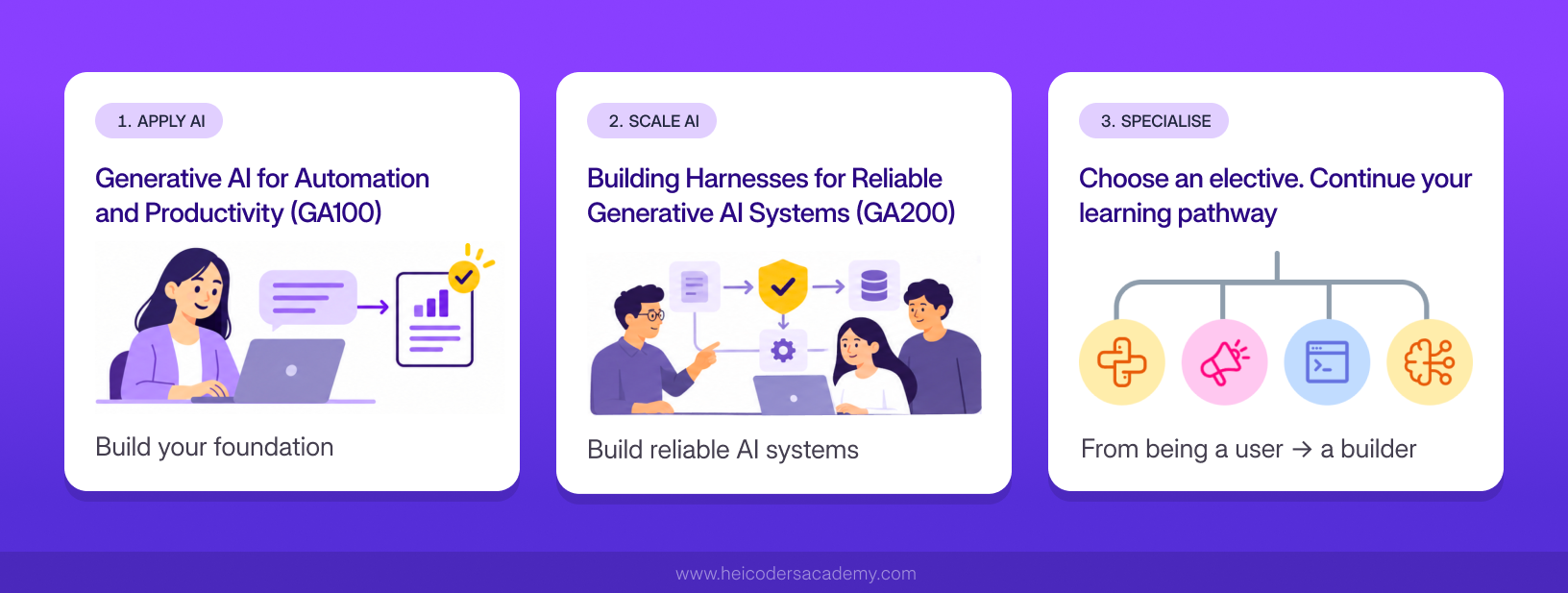
The Generative AI Nanodegree is a structured pathway of three courses. It combines GA100 and GA200 with one specialist elective, so you go from using AI confidently, to building reliable AI systems, to going deeper in the direction most relevant to your work.
| Step | Course | Focus | Coding needed |
|---|---|---|---|
| Step 1: Apply AI | GA100 | Prompt engineering, context engineering, MCP and RAG, AI agents and workflows, AI governance | None |
| Step 2: Scale AI | GA200 | Harness engineering, multi-agent systems, multimodal RAG, reusable Skills, evaluation and guardrails | None |
| Step 3: Specialise | One elective of your choice | Depends on the elective you choose | Depends on the elective |
Choosing Your Elective
The elective is where the pathway becomes your own. You choose one of four courses:
- Python Programming and Data Visualisation (AI100): suits you if you want to work directly with data and automate tasks using Python.
- Applied Machine Learning (AI200): suits you if you want to understand how predictive models are built and trained.
- Responsive Web Development (SE100): suits you if you want to build the web interfaces that people use to interact with tools and applications.
- Digital Marketing with AI (DM100): suits you if your work involves marketing, campaigns or content.
Some electives involve coding and others don’t, so you can complete the full pathway without coding if you prefer.
Who the Nanodegree Suits
The Nanodegree is a good fit if you want more than a single course, but don’t want to piece together your own learning path. It suits professionals who use AI casually and want to work with it strategically, and people who want to build their own automations rather than wait on IT. It also suits team leads who expect to guide AI adoption across their team.
You don’t have to commit to all three courses on day one. Each course stands on its own and awards its own WSQ Statement of Attainment, so many learners start with GA100 and decide on the rest of the pathway afterwards.
Frequently Asked Questions About Generative AI Courses
Do I need coding experience for a generative AI course?
Not for GA100 or GA200. Both courses use tools that don't require writing code, including n8n and AI builder tools. For GA100, you need basic digital literacy, such as being comfortable with email and web browsing.
Do I need to take GA100 before GA200?
GA200 is designed as the next step after GA100, and it builds on skills such as prompting, RAG, MCP and AI agents. If you already have equivalent experience, speak with the Heicoders team about whether GA200 suits you.
What's the difference between the Generative AI Nanodegree and the Artificial Intelligence Nanodegree?
They lead to different kinds of AI skills.
The Generative AI Nanodegree is for professionals who want to apply and scale generative AI tools in their work. Its two core courses, GA100 and GA200, need no coding. They focus on prompting, AI agents, automation and building reliable AI systems with existing tools. You then add one elective to specialise.
The Artificial Intelligence Nanodegree is a code-first pathway for people who want to build and deploy their own machine learning models. It runs in three steps:
- Python Programming and Data Visualisation (AI100), which covers Python and data libraries such as Pandas.
- Applied Machine Learning (AI200), which covers predictive modelling with Scikit-learn.
- Deploying Machine Learning Systems to the Cloud (AI300), which covers packaging models as APIs and deploying them on Amazon Web Services (AWS).
It suits developers, technically minded professionals and anyone considering further study in AI.
A simple way to choose: if you want to direct and apply AI tools in your work, start with the Generative AI Nanodegree. If you want to build AI models yourself, the Artificial Intelligence Nanodegree is the better fit.
How long does each course take?
Each course runs for 18 hours across six lessons. You can take them over three full days or six part-time sessions, in a classroom or online.
What AI tools will I use?
In GA100, you'll work with tools such as ChatGPT, Nano Banana, ElevenLabs, Manus AI and n8n. In GA200, you'll work with work-oriented AI environments such as ChatGPT Work and Claude Cowork. Both courses focus on the principles behind the tools, so your skills carry over as tools change.
Will I build something I can use at work?
Yes. Each lesson is applied to realistic work tasks. GA100 ends with a capstone project where you apply your skills to a problem of your choice.
Is there an assessment?
Yes. To receive the WSQ Statement of Attainment for either course, you need to meet the attendance requirements and pass the assessment.
What is harness engineering?
Harness engineering is the practice of designing everything around an AI model, including its instructions, tools, permissions, memory and checks, so the system behaves reliably in real use. It's a core focus of GA200.
Is GA200 suitable for managers who don't build AI tools themselves?
Yes. GA200 is designed for AI champions, team leads, managers, and vendor and project owners, as well as hands-on builders. It covers the judgement needed to set up AI use across a team and to assess whether an AI system will hold up once it's live.
From Using Generative AI to Building With It
The real test of a generative AI course is whether you leave with something you can use on Monday morning. GA100 moves you from understanding how AI works to building workflows, agents and tools around your own tasks. GA200 then moves you from tools that work for you to systems a team can rely on.
Building with AI is a skill, and like any skill, it improves with structured practice and the right guidance. Heicoders Academy’s Generative AI for Automation and Productivity course (GA100) is designed for working professionals in Singapore who want to apply AI practically across their role, from writing better prompts to automating repetitive workflows. Explore the GA100 Generative AI Course and see upcoming class dates.